
Starting a business in India is an exciting journey, but navigating the compliance landscape can feel overwhelming, especially when it comes to obtaining essential registrations like How to Get ESIC Number, the ESIC number, LIN number, and EPF/ESIC credentials for a company registered with the MCA portal. If you’ve recently incorporated your company, applied for EPF and ESIC, and received your incorporation certificate, PAN, TAN, and EPF number, but are still waiting for your ESIC number, LIN number, or login credentials, you’re not alone. Many new entrepreneurs face delays or confusion in this process.
In this 2025 guide, we’ll walk you through the step-by-step process to retrieve these critical compliance numbers and credentials, complete with screenshots (placeholder descriptions) to make it easy. We’ll also cover troubleshooting tips, trending keywords like MCA portal registration, ESIC online registration, and Shram Suvidha portal, and practical solutions to ensure your business stays compliant. Let’s dive in!
Why Are ESIC, LIN, and EPF Credentials Important?
Before we get to the solutions, let’s understand why these numbers and credentials matter for your business:
- ESIC Number: A 17-digit unique identifier issued by the Employees’ State Insurance Corporation (ESIC), it allows your employees to access healthcare benefits, maternity leave support, and financial assistance under the ESI Act, 1948. It’s mandatory for businesses with 10 or more employees (20 in some states) earning up to ₹21,000/month.
- LIN Number: The Labour Identification Number (LIN) is a unique ID issued via the Shram Suvidha Portal to streamline compliance with labor laws. It’s essential for integrating multiple labor registrations.
- EPF Number: Assigned by the Employees’ Provident Fund Organisation (EPFO), this number facilitates provident fund contributions for employees earning up to ₹15,000/month. It’s mandatory for businesses with 20 or more employees.
- EPF/ESIC Credentials: These are login details (username/password) for the EPFO and ESIC portals, enabling you to file returns, manage contributions, and ensure compliance.
Since you’ve applied for these through the MCA portal using the SPICe+ and AGILE-PRO forms during company incorporation, delays in receiving the ESIC number, LIN number, or credentials could stem from technical glitches, incomplete submissions, or processing backlogs. Let’s explore how to resolve this. How to Get ESIC Number
Step-by-Step Guide to Retrieve ESIC Number, LIN Number, and EPF/ESIC Credentials
Here’s a detailed, step-by-step process to retrieve your missing compliance numbers and credentials. Each step includes a placeholder for a screenshot to guide you visually.
Step 1: Check the MCA Portal for Application Status
The MCA portal (www.mca.gov.in) is your starting point since you applied for EPF and ESIC via the AGILE-PRO form during incorporation.
- Log in to the MCA Portal:
- Visit www.mca.gov.in and click on MCA Services > Login.
- Enter your User ID and Password (the ones used during company registration).
- If you’ve forgotten your credentials, use the Forgot Password option with your registered email or mobile number.
- Navigate to SPICe+ Dashboard:
- Once logged in, go to MCA Services > SPICe+ or Track Application Status.
- Locate your SPICe+ or AGILE-PRO form submission using your SRN (Service Request Number).
- Check Approval Documents:
- Download the incorporation certificate and any AGILE-PRO approval documents. The ESIC number and LIN number are often included in these PDFs or sent via email.
- Look for a section titled ESIC Registration Details or Labour Compliance.
Screenshot Placeholder: Image showing the MCA portal login page with the “Login” button highlighted, followed by the SPICe+ dashboard with the “Track Application Status” option circled.
Tip: Check your registered email (used during MCA registration) and spam/junk folders for emails from MCA or ESIC containing the ESIC number or LIN details.
Step 2: Verify ESIC Number on the ESIC Portal
If the ESIC number isn’t in the MCA documents, head to the ESIC portal to retrieve it.
- Visit the ESIC Portal:
- Go to www.esic.gov.in and click on Employer Login under the Employer section.
- Use Forgot Password (If No Credentials):
- If you haven’t received login credentials, click Forgot Password.
- Enter your company PAN, TAN, or ESIC number (if partially known) to reset the password.
- A reset link will be sent to your registered email or mobile.
- Check ESIC Number in Dashboard:
- Once logged in, navigate to the Employer Dashboard. The 17-digit ESIC number should be displayed under Registration Details.
- Download Registration Letter (C-11):
- Look for an option to download the Registration Letter (C-11), which confirms your ESIC registration and includes the ESIC number.
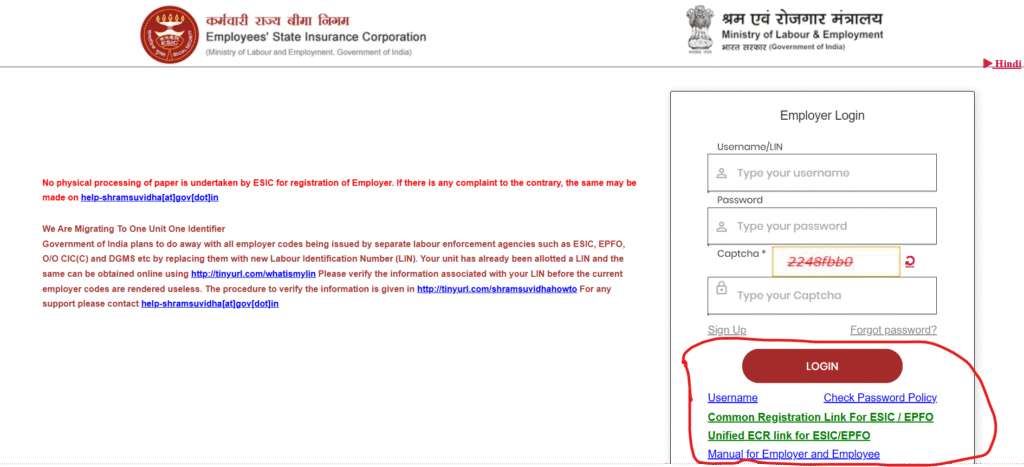
ESIC online registration 2025, ESIC employer login– Website link for ISIC
Step 3: Retrieve LIN Number via Shram Suvidha Portal
The LIN number is issued through the Shram Suvidha Portal, which integrates labor compliance for new companies.
- Access Shram Suvidha Portal:
- Visit registration.shramsuvidha.gov.in and click on Know Your LIN.
- Enter Company Details:
- Input your company PAN, TAN, or EPF number to search for the LIN.
- If your AGILE-PRO submission was successful, the LIN should be linked to your company.
- Check Registration Status:
- Navigate to Registration Status or Track Application to see if the LIN is pending or issued.
- Download any available LIN certificate or confirmation.

Shram Suvidha LIN registration, LIN number check online– click here for website link
Step 4: Obtain EPF Credentials
Since you’ve received the EPF number, you need login credentials to access the EPFO portal for compliance.
- Visit EPFO Portal:
- Go to www.epfindia.gov.in and click on Establishment Login under Services for Employers.
- Reset Password:
- If you don’t have credentials, click Forgot Password.
- Enter your EPF number, company PAN, or TAN to initiate a password reset.
- Follow the link sent to your registered email to set a new password.
- Access Employer Dashboard:
- Log in with the new credentials to manage EPF contributions and filings.

EPFO employer login, EPF registration online 2025– link for EPFO employer login
Step 5: Contact Authorities for Delays
If the above steps don’t yield results, reach out to the relevant authorities for manual intervention.
- ESIC Regional Office:
- Contact your local ESIC office or call the toll-free helpline 1800-11-2526.
- Email [email protected] with your incorporation certificate, PAN, TAN, and AGILE-PRO acknowledgment.
- Visit the office with these documents for in-person support.
- Shram Suvidha Support:
- For LIN issues, email [email protected] or call 011-23354722 (2:00 PM to 5:00 PM).
- Provide your company details and proof of MCA registration.
- MCA Helpdesk:
- If the issue stems from the MCA portal, email [email protected] or use the MCA grievance portal.
- Mention your SRN and details of the AGILE-PRO submission.

ESIC helpline number, MCA grievance portal
Step 6: Engage Professional Services (Optional)
If navigating portals or contacting authorities feels daunting, consider hiring a compliance expert.
- Services like IndiaFilings or a chartered accountant can handle ESIC registration, LIN issuance, and credential retrieval.
- They can also ensure timely ESI return filing and EPF compliance.
IndiaFilings ESIC registration, professional compliance services
Troubleshooting Common Issues
Here are common reasons for delays and how to fix them:
- Incomplete AGILE-PRO Submission:
- Errors in PAN, TAN, or employee details during MCA registration can delay ESIC/LIN issuance.
- Log in to the MCA portal, check the AGILE-PRO status, and resubmit if permitted.
- Technical Glitches:
- Portal integration issues between MCA, ESIC, and Shram Suvidha can cause delays.
- Contact the respective helpdesks with your SRN and company details.
- Threshold Non-Compliance:
- ESIC (10 employees) and EPF (20 employees) registrations are mandatory only when thresholds are met. If your company is new, registration may be processed but not activated.
- Update employee count on the Shram Suvidha or ESIC portal.
- Email Delivery Issues:
- Check spam/junk folders for emails from MCA, ESIC, or EPFO containing credentials or numbers.
- Update your email ID on the portals if incorrect.
ESIC registration issues, MCA AGILE-PRO errors
Best Practices for Compliance in 2025
Once you retrieve your ESIC number, LIN number, and credentials, follow these tips to stay compliant:
- File Returns Timely: Submit ESI returns (every 6 months) and EPF contributions (monthly) to avoid penalties.
- Monitor Portals: Regularly check the MCA, ESIC, and Shram Suvidha portals for updates.
- Keep Documents Ready: Store your incorporation certificate, PAN, TAN, EPF number, and AGILE-PRO acknowledgment for quick reference.
- Stay Updated: Follow Ministry of Labour and Employment notifications for changes in ESIC/EPF rules in 2025.
ESI return filing 2025, EPF compliance guide
Conclusion
Obtaining your ESIC number, LIN number, and EPF/ESIC credentials for an MCA-registered company doesn’t have to be stressful. By following this step-by-step guide, checking the MCA portal, ESIC portal, and Shram Suvidha portal, and contacting authorities when needed, you can resolve delays and ensure compliance. Whether you’re a startup or an established business, staying on top of ESIC registration, LIN issuance, and EPF compliance is crucial for your employees’ welfare and your company’s growth.
If you’re still facing issues, don’t hesitate to reach out to ESIC helpline (1800-11-2526), Shram Suvidha support (011-23354722), or professional services like IndiaFilings. Keep this 2025 guide handy, and let us know in the comments if you have questions about MCA portal registration or labor compliance!
MCA portal compliance 2025, startup compliance guide
